Play eCar
Tip
eCar factory default burning Arduino web app code, you can control it through the mobile browser after installing eCar!
eCar factory default code can be controlled in two ways: IR remote control and Web app control.
IR remote control
Turn the power switch ON the eCar to the “ON” state.
Make sure the infrared remote control has batteries installed.
Now you can control mCar!
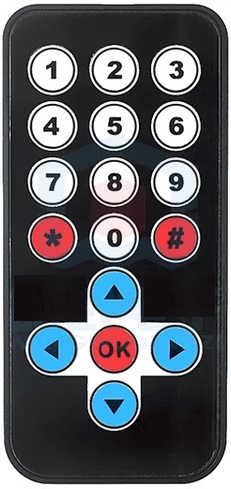
Button |
Function |
|---|---|
0 - 9 |
Play different songs. |
# |
Play or pause the song. |
* |
Turn on or off the LED light. |
▲ |
Forward |
▼ |
Backward |
◀ |
Turn left |
▶ |
Turn right |
OK |
Stop |
Web app control
Turn the power switch ON the eCar to the “ON” state.
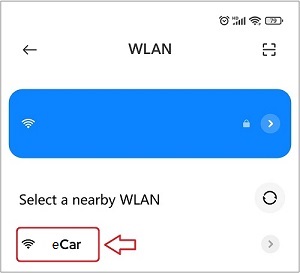
The phone searches and connects to mCar’s wifi.
Tip
After connecting to Wifi, your phone may pop up a window saying it cannot connect to the network, please ignore it!
Open your phone’s browser and link to it by typing “192.168.4.1” in the address bar.

Note
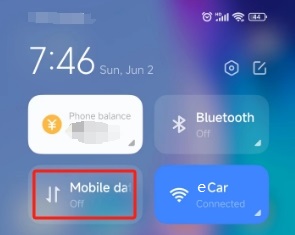
Close the mobile phone’s mobile network data, otherwise it may not enter the Web page control page!
The following screen should appear in your browser, and now you can control mCar!
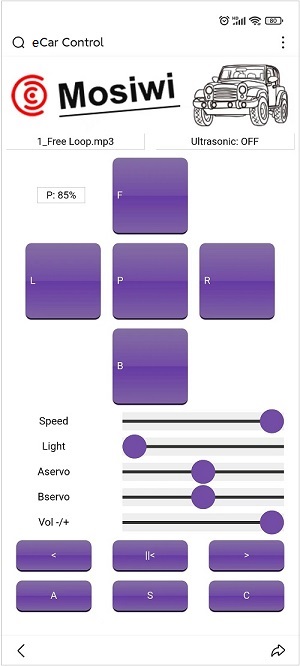
Button |
Function |
|---|---|
Left display window |
Displays the name of the song. |
Right display window |
Display the distance measured by the ultrasonic module. |
P: xxx% |
Displays the battery level. |
F |
Press the button, the car forward; Release the button and the car stop. |
B |
Press the button, the car backward; Release the button and the car stop. |
L |
Press the button, the car turn left; Release the button and the car stop. |
R |
Press the button, the car turn right; Release the button and the car stop. |
P |
Press the button, the horn will sound; release the button and the horn will stop. |
Speed |
Adjust the speed of the car. |
Light |
Adjust the brightness of the LEDs. |
Aservo |
Adjust the Angle of the ultrasound. |
Bservo |
Reserved, if the servo2 interface is connected to the servo, its Angle can be controlled. |
Volt +/- |
Control the volume of the speaker. |
< |
Returns the last song. |
||< |
Play or pause the song. |
> |
Switch to the next song. |
A |
Turn RGB LED flashing on or off. |
S |
Turn on or off the ultrasonic measuring distance. |
C |
Reserve |
End!